 MotionAI
Become the main character of the scene
Add a front-facing photo of yourself and the Main Character effect puts you into a 15-second cinematic scene: you walk through a crowd of people in dark suits while the camera follows. The camera moves, the people around you and the sound stay exactly as in the original; only the lead changes, and it's you. Three more angles of your face make the likeness much closer.
- 700 credits
- Included with a plan
Your photos
One front photo is enough to start. Adding the other three angles makes the face much closer to you.
How to take them
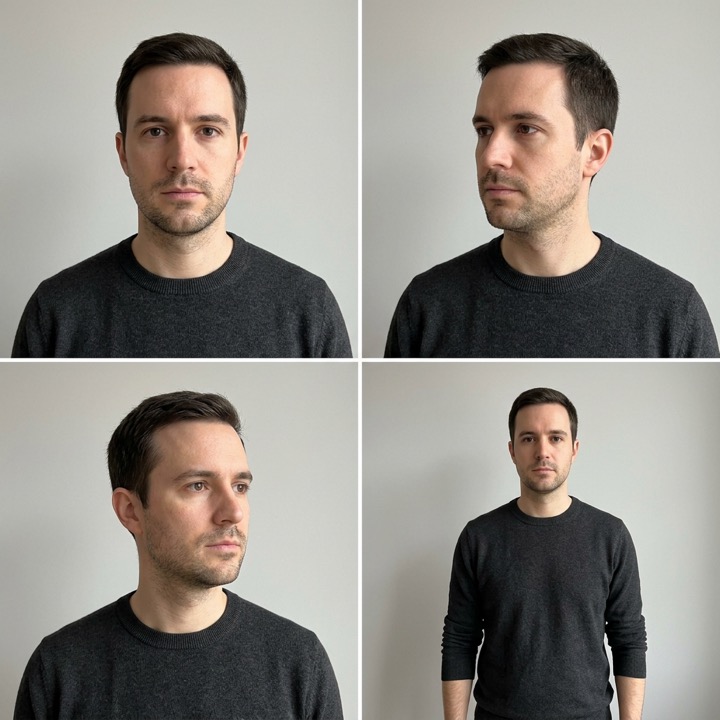
Use the back camera at eye level, about 1 m away, in soft daylight. No glasses, hats or filters.
Effect
How it works
- 1
Add your photos
A front-facing photo, and if you can, left, right and waist-up shots.
- 2
Confirm and generate
Confirm the photos are yours, then start the video.
- 3
Get your video
In about 15 minutes you're the main character of the scene. Play it here or download it.
Photos that work best
- A front-facing photo looking straight at the camera, with a neutral expression
- Left, right and waist-up shots of the same person, taken the same day
- Soft daylight, the back camera at eye level, no glasses, hats or filters
Ideas for the prompt box
- Keep the outfit from my photos
- Wear a long black coat like the original
- Give a small, confident smile at the camera
Questions about this effect
Why does it ask for four photos?
One front photo is enough to start. The scene shows you from many angles, though, so photos turned left, turned right and waist-up help the face stay close to yours in every shot.
Can I use someone else's photos?
Only with their permission. Before you start, you confirm the photos are of you or that the person agreed. Photos of children aren't allowed.
How long is the video, and how long does it take?
The video is 15 seconds, in landscape, with the scene's original sound. It takes about 15 minutes, and you can leave the page while it's being made.
How long does it take?
Most videos are ready in a few minutes. You can leave the page; your video waits for you under Your videos.
What if a video fails?
If a video can't be made, its credits go back to your balance automatically.